Register an externally trained ML/DL Model
To register an externally trained ML/DL model and utilize it within the SYNERGIES AI Analytics Platform, you can utilize the "Register Model" Button found in the “My Assets” main view. This action allows the model to be recognized as available within the platform and facilitates sharing among stakeholders across the energy data value chain, both within and beyond the organization.
When registering a model, you must furnish certain details:
- General information such as title and description.
- Specifics about the model including its source (e.g., trained within or outside the platform), the library used, model type, purpose, and algorithm name.
- Licensing information similar to that of datasets/results.
As coding directly within the SYNERGIES AI Analytics Platform is prohibited due to security concerns, you can register pre-trained analytics models that you have created offline by appropriately packaging them in accordance with the instructions provided (depending on the library you have selected). These models can be uploaded through the "Model Upload and Validation" section, along with relevant model file(s), sample data, and the definition and ordering of model features, as illustrated in the accompanying figure.
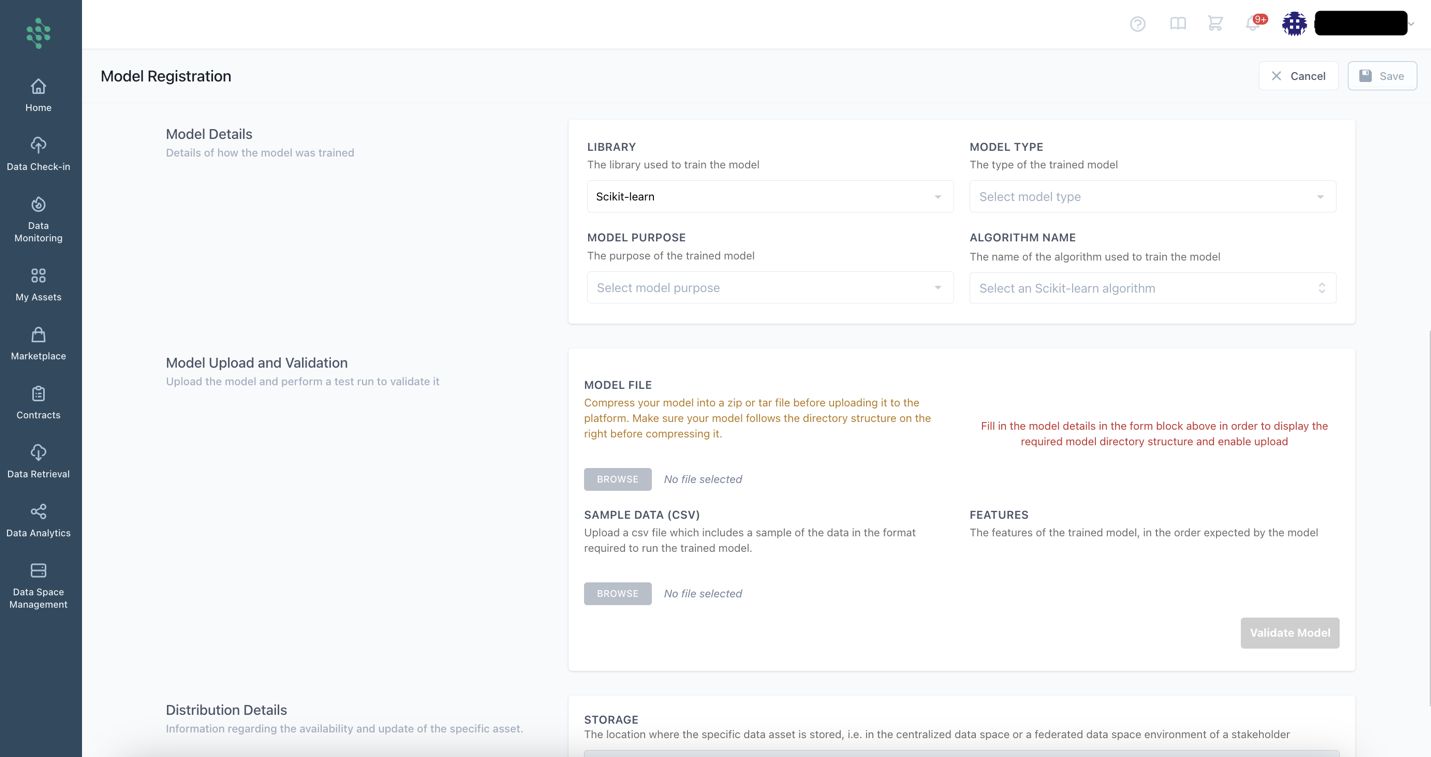
Upon saving the model details, the platform proceeds to validate the model by applying it to the provided sample data. If the model is properly packaged with compatible library versions and all necessary information is provided, the validation process succeeds. Otherwise, an error message appears.